Support & Documentation
Documentation
Admin Basics
Introduction to Folderize
Installation & Quick Start
New! Lightning Components
User Basics
Browsing & Filtering (except mobile)
Search Across Folders / What’s New
Mobile Interface
Content
Managing Documents
Managing Folders
Using Folder Tags
Permissions
Permissions Overview
App Permissions
Document Permissions
Folder Permissions
Profile Settings
Folderize For Objects
Folders For Object-Records
Add Folderize To a Layout
Using Lightning App Builder
Roll-Up Files To Parent Object
Link Records To Folders (Another Way)
About Sharing Inheritance
Replicator
The Replicator Utility
Uploading Folders
New! Downloading Folders
Communities
Road Map
Configure Permissions
Add Folderize Component
Configure Folder Sharing
Configure File Sharing
Admin Miscellaneous
Admin Tools
About the Tabs & Renaming Tabs
System Limits
Getting Support
Updating the App
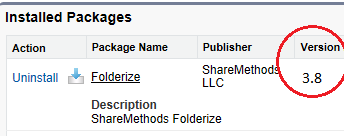
ShareMethods may or may not automatically update your instance to the latest version. This depends on various considerations:
- Major releases generally are “pushed” to all customers on a rolling schedule.
- Minor releases may be given only to certain customers in need of a specific bug-fix or small enhancement.
- Automatic updates may not take effect for some orgs due to the org being unavailable when the update is conducted, or other technical complications in the push procedure.
- Sandboxes generally are updated a week or more in advance of production orgs, as a quality assurance step.
To see which version you have, click the Folderize Menu then Admin Tools. The version number also is shown on your Salesforce Setup Installed Packages page.
Then go to the Folderize Agentexchange page. In the Additional Information section, it will list the current published version. If you don’t have the latest, click Get It Now, without uninstalling. This will install the changed components while preserving your existing files, folders, and customizations.
Even if you have the latest version as described above, there may be a minor bug-fix release available that wasn’t published on Agentexchange. So do contact support if you have any problem not solved by updating.
Also note that, if a capability described in this guide appears to be missing from your instance, it may be because, when we “pushed” a version update, new feature permissions were set to “disallowed” initially. Salesforce enforces this behavior for security reasons when new components are added to existing installs. Contact Support for guidance as to which permissions to enable.
When Contacting Support
If you have a problem or encounter a situation that is unexpected: First, confirm you have the latest version (above). If that doesn’t solve it, then please send us as much detail as possible about your problem, including, as applicable:
- Description of actions that led to the situation.
- Text of any error message.
- Screen shots.
- Error messages from Developer Console (F12 key in most pc browsers).
- Copy of debug logs for that time (Setup | Monitoring | Debug Logs).
Suggest a feature
We want to hear your suggestions and feature requests. If we agree with an idea you submit, we will add it to our enhancement list for a forthcoming release. If you can’t wait for that, you could consider engaging our professional services team to create a custom Folderize version for your organization.